 WalkthroughAI Agent
Meet Enconvo Live Avatar
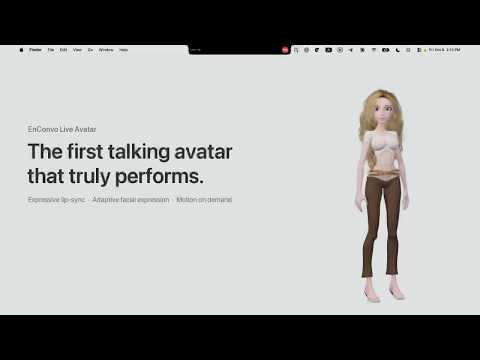
Talk to an expressive AI avatar, ask it to move or dance, then watch it check the weather and book a restaurant through your browser.
Watch walkthroughEnconvo is an AI agent that lives across your Mac — it sees your screen, works inside your apps, and actually gets things done.
Free to start · macOS 14+ · Intel & Apple Silicon
Enconvo — Meet Enconvo Live Avatar
Made for the work you do.
Write, research, build, and take care of the everyday. See real tasks come together on a Mac, one walkthrough at a time.
6 of 16 walkthroughs
WalkthroughAI AgentTalk to an expressive AI avatar, ask it to move or dance, then watch it check the weather and book a restaurant through your browser.
Watch walkthrough WalkthroughEveryday Tools
Sign in on the Enconvo iPhone app, show the pairing code on your Mac, and scan it. Your Mac’s projects and chats are then on your phone, and every chat keeps running on your Mac — a narrated walkthrough in seven steps.
Watch walkthrough Read the guide WalkthroughWorkflows
Create a workflow from the starter template, add a step by hand, let the workflow assistant add another, then run it and check what every step produced — a narrated walkthrough in eight steps.
Watch walkthrough Read the guide WalkthroughAI Agent
Ask Enconvo to analyze an NVDA chart, write a Pine Script strategy, and backtest it in TradingView — all from the sidebar.
Watch walkthrough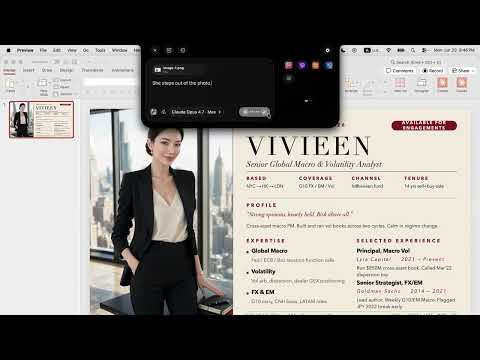 WalkthroughAI Agent
Turn a résumé into a polished personal website with Standing. Enconvo reads the CV, builds the page, and helps publish a professional online presence from your Mac.
Watch walkthrough WalkthroughEveryday Tools
Set up Enconvo’s Dynamic Island, choose your AI models, and launch any command with a hover — without breaking your flow.
Watch walkthrough100+ built-in AI tools for writing, search, translation, and more.
Make them your own with plugins, skills & workflows.
Any AI. Your terms.
One app for every provider — language, image, video, speech, and transcription — with nothing locked to a single vendor.
Language models · Image · Video · Speech · Transcription
Plug in your own API keys and AI usage is never metered. No token caps, no run limits, on every tier.
Sign in with your existing ChatGPT, Claude, or Grok subscription and use it right inside Enconvo.
Skip the setup with Enconvo Cloud, or run MLX, Ollama, and LM Studio models fully offline on your Mac.
A platform, not a chatbox.
Everything the agent can do is a building block you can extend.
Connect any Model Context Protocol server — HTTP, SSE, or stdio — and its tools are available everywhere.
An open-source extension arsenal covering search, OCR, media, documents, and more. All on GitHub.
Teach the agent repeatable procedures. Install skills from the community or write your own.
Chain tools, prompts, and conditions into one-hotkey automations with a visual editor.
On your desktop. In your pocket.
A pixel-art pet lives on your desktop and mirrors what your agents are doing — running, done, or waiting on you. Tap it to jump straight to the session that needs attention. Compatible with the open Codex pet-pack format, so community characters just work.
Away from your desk? Message your agent from Telegram, Discord, Slack, or Feishu — it runs the task on your Mac and reports back when it's done.
Pair your iPhone or Android phone with Enconvo on your Mac to reach its projects and chats from anywhere. Every chat keeps running on your Mac, and messages are end-to-end encrypted.
See what our users are saying about their experience with Enconvo's AI-powered features and workflow integrations.
I'm thrilled to have found Enconvo! After using Beam until it stopped updates and then Bolt AI, which lacks those helpful floating desktop integration, Enconvo is perfect. Huge thanks to the team for their hard work. I hope they get the recognition they deserve.

The context awareness feature is a game changer. Being able to select text anywhere and instantly access AI assistance through PopBar has dramatically improved my workflow. The voice input and image generation capabilities are icing on the cake.

The knowledge base integration is brilliant - I can seamlessly search through my documents and get AI-powered insights. The workflow customization lets me combine plugins exactly how I need them. EnConvo has become an indispensable part of my daily work.

As a content creator, the AI web search and image generation features save me hours of work. The plugin system is incredibly versatile - I've created custom workflows that perfectly match my creative process. Truly an all-in-one solution.

The Spotlight-like smart bar is incredibly intuitive. I love how it understands context from my browser tabs and Finder selections. The live closed captions feature is fantastic for accessibility. EnConvo thinks of everything!

Having over 100 plugins available means I can extend functionality however I need. The voice input method is surprisingly accurate, and the OCR capabilities are excellent. This tool has revolutionized how I interact with AI on my Mac.

Pricing
Two ways to pay for AI — and they stack.
Use your own API keys or local models — AI usage is free and unlimited on every tier.
30-day money back guarantee.
30-day money back guarantee.
One account for your whole team. 30-day money back guarantee.
one-time · $27.80/seat
No API keys. A monthly point allowance powers every model and service.
No API keys — points included.
500,000points / month
DeepSeek, MiniMax M3 & GLM-5.3-Flash at half price.
2,500,000points / month
DeepSeek, MiniMax M3 & GLM-5.3-Flash at quarter price.
5,000,000points / month
Free has every feature below, with these limits. Any paid plan removes all of them.
Same features on all six plans. Only these five things change.
| Plan | License Standard $49once One Mac, your own API keys. | License Premium $99once Lifetime updates on up to 3 Macs. | License Teams $139once · 5 seats One account for a team, +$20 a seat. | Cloud Plus $10/month Light daily use, no API keys. | Most popular Cloud Pro $50/month Heavy daily use and agents. | Cloud Max $100/month All-day agents and long tasks. |
|---|---|---|---|---|---|---|
| Choose seats | ||||||
| Cloud pointsFor Cloud models and services | 50,000 bonus | 150,000 bonus | 50,000 / seat | 500K / month | 2.5M / month | 5M / month |
| Model discountsDeepSeek, MiniMax M3 & GLM-5.3-Flash | Standard rate | Standard rate | Standard rate | Standard rate | 1/2 price | 1/4 price |
| Mac devicesSigned in at the same time | 1 | 3 | 5 – 500 | 5 | 5 | 5 |
| Sync storageChats, settings & knowledge across Macs | 50 MB | 100 MB | 100 MB | 100 MB | 100 MB | 100 MB |
| Updates & supportNew versions of Enconvo | 1 year of updates | Lifetime updates | Lifetime updates | Updates + priority support | Updates + priority support | Updates + priority support |
Most of Enconvo is on every plan, Free included. Tags show where Free has a limit.
Any model, one assistant
Agents that do the clicking
One shortcut away
Talk instead of type
Answers from your own files
Work that runs on its own
Your Mac, wherever you are
Learn how Enconvo works, which Macs it supports, and how to choose between local models, your own API keys, and Cloud.
Enconvo is a native AI assistant and agent for Mac. It works beside your apps, understands screen and selected-text context, and helps with writing, research, app automation, dictation, and document search.
Yes. The free tier includes every core feature, with unlimited AI when you bring your own API key or run local models. Paid tiers remove creation caps (knowledge bases, workflows) and add Cloud points.
No. Cloud plans include a monthly point allowance with zero key setup. If you prefer your own keys or local models, that usage is free and unlimited on every tier — including the free one.
Yes. Sign in with those accounts and Enconvo can use the subscriptions you already pay for, right inside the app.
Enconvo requires macOS 14 or later and supports both Intel and Apple Silicon Macs. Choose the matching installer from the Download for macOS menu.
No, we do not use any user data for training. All data is encrypted during transmission and we only store basic usage analytics. Your data is never stored on our servers.
No, Enconvo is a native macOS application built for optimal performance and system integration.
Yes. Run local models through MLX, Ollama, or LM Studio — including on-device speech recognition — and your data never leaves your Mac.
Local models run on your Mac through MLX, Ollama, or LM Studio. Cloud models use online providers. Enconvo Cloud includes points for supported services; you can also bring your own API keys, with any provider charges billed separately.
Standard, Premium and Teams licenses come with a 30-day money-back guarantee. Request a refund in Enconvo under Settings → Account, or email support@enconvo.com. Enconvo Cloud subscriptions can be canceled at any time.
While Enconvo itself is not open source, all Enconvo extensions are open source and can be found on https://github.com/enconvo
We offer a 30% discount for students. Please contact us by sending an email to support@enconvo.com to get your discount code.


